/Codec-logo.svg "Codec Logo")
/Codec%20-%20Website%20Assets/codec-white-logo.svg)

Microsoft licensing can feel complicated. With Microsoft 365 E3, E5 and now E7 in the mix, organisations need to understand what each license includes and what must be in place for those capabilities to deliver real value.
That distinction matters. Moving to a more advanced license can unlock new technology, but it does not automatically resolve existing issues with data access, identity management, security controls or governance.
As organisations introduce Microsoft 365 Copilot and AI agents, licensing decisions therefore need to become part of a wider conversation: Is the organisation ready to use these capabilities securely, consistently and at scale?
What is the difference between E3, E5 and E7?
At a high level, each license builds on the one before it.
Microsoft 365 E3: The productivity foundation
Microsoft 365 E3 provides the core applications and services many organisations use every day, alongside baseline identity, device-management, security and compliance capabilities.
For example, E3 includes core Microsoft Purview features such as manual sensitivity labelling, retention policies and Data Loss Prevention across Exchange, SharePoint and OneDrive. It also includes Microsoft Entra ID Plan 1 and Microsoft Defender for Endpoint Plan 1.
Organisations with E3 can purchase Microsoft 365 Copilot as an add-on. This makes E3 a valid starting point for Copilot adoption, but the license alone does not guarantee that organisational data is appropriately classified, permissions are controlled or employees understand how to use AI safely.
Microsoft 365 E5: Advanced security and compliance
E5 builds on the E3 foundation with more advanced identity, security and compliance capabilities.
This includes the broader Microsoft Defender XDR platform, advanced Microsoft Purview functionality and Microsoft Entra ID Plan 2. Depending on the capability, organisations gain features such as automated sensitivity labelling, expanded Data Loss Prevention, advanced auditing, insider-risk management, identity protection, access reviews and Privileged Identity Management.
These controls become increasingly important as Copilot is introduced. Copilot works within the access permissions already assigned to each user. If those permissions are overly broad, poorly maintained or no longer appropriate, AI can make existing governance weaknesses more visible.
E5 provides a stronger security and compliance foundation, but this still needs to be configured around the organisation’s data, risk profile and operating model.
Microsoft 365 E7: AI, security and governance in one suite
Microsoft 365 E7, also known as the Frontier Suite, became generally available on 1 May 2026. It combines:
- Microsoft 365 E5
- Microsoft 365 Copilot
- Microsoft Entra Suite
- Microsoft Agent 365
Microsoft positions E7 as a single platform bringing together productivity, AI, identity, security and agent management.
Rather than replacing E5 capabilities, E7 extends them. It adds Copilot for AI-powered work, the full Microsoft Entra Suite for identity and network access, and Agent 365 for centrally managing, governing and securing AI agents.
Where does Agent 365 fit?
The introduction of AI agents changes the licensing and governance conversation.
An agent may be able to access information, interact with systems and carry out tasks across an organisation. That makes questions of ownership, permissions and accountability essential:
- What agents exist across the environment?
- Who owns each agent?
- What information can it access?
- What actions is it permitted to take?
- What happens when its owner changes role or leaves?
- How are its activities monitored and audited?
The central principle is that agents should be governed with the same discipline applied to human identities, including defined ownership, controlled access, lifecycle management and auditability.
Agent 365 provides a unified control plane through which organisations can observe, govern and secure agents. Microsoft states that its capabilities include centralised agent visibility, identity protection, lifecycle management, access governance, security-posture management and threat investigation. Agent 365 is included in E7 and is also available separately as an add-on.
Defender and Purview still matter in an agent-led environment
AI governance is not a separate layer that sits outside an organisation’s existing security and compliance approach. It depends on that foundation.
Microsoft Defender helps organisations identify and respond to threats across identities, endpoints, applications and data. Within E7, these protections extend further into agent activity, supporting areas such as agent security-posture management, suspicious-activity detection and investigation.
Microsoft Purview provides the data-governance and compliance layer. E7 extends E5 capabilities into agent interactions, including label-aware agent activity, Data Loss Prevention for agent interactions, agent-related audit trails and support for discovering agent interaction data during legal or internal investigations.
This is important because an agent can only be governed effectively when the organisation understands the data it is using. If sensitive information has not been identified, access is too broad or retention policies are inconsistent, adding agent-management technology will not resolve the underlying problem.
Understanding how the licenses build on each other
Microsoft licensing can feel complicated because each tier adds new capabilities on top of the previous one. Rather than thinking of E3, E5, and E7 as separate products, it’s more helpful to view them as layers of productivity, security, governance and AI capabilities.
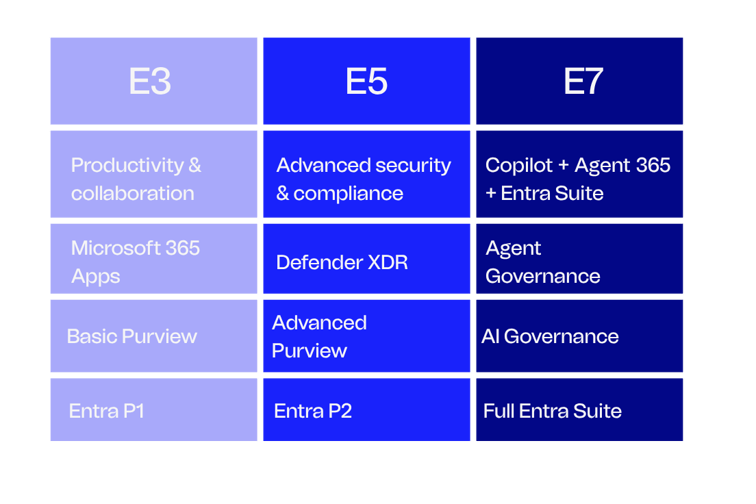
View Microsoft 365 Maps E3/E5/E7 licensing diagram
Why moving license does not equal becoming ready
It is easy to treat the move from E3 to E5 or E7 as a procurement exercise. In practice, the license is only one part of the change.
Microsoft describes E7 as a superset of E5, so an organisation can purchase E7 without first spending a defined period on E5. However, that does not mean every organisation can move directly from E3 and immediately use the full E7 capability effectively.
Before scaling Copilot and AI agents, organisations may need to address:
- Data classification and sensitivity labelling
- Existing user and application permissions
- Stale accounts and unused identities
- Conditional Access policies
- Identity lifecycle processes
- Data Loss Prevention and retention policies
- Agent ownership and approval processes
- Monitoring, auditing and accountability
- Employee adoption, training and change management
The technical foundation also needs to be matched by an operating model. Someone must be responsible for approving agents, reviewing their access, responding to risks and removing them when they are no longer required.
This is why the right question is not simply, “Can we buy E7?” It is, “What needs to change so that we can use E7 securely and get value from the investment?”
Choosing the right path
There is no single licensing journey that will suit every organisation.
For some, E3 with Microsoft 365 Copilot may be the right place to begin, supported by focused work on data governance and adoption. Others may need E5 to strengthen their security, compliance and identity foundation before introducing AI more widely.
Organisations already using E5 may see a clearer route to E7 because many of the underlying Defender, Purview and identity capabilities are already available. E7 then brings Copilot, the full Microsoft Entra Suite and Agent 365 together in one license.
The decision should be based on what the organisation wants to achieve, the maturity of its existing environment and the work required to implement the capabilities properly.
From licensing decision to practical value
The move towards Copilot and AI agents is making licensing more closely connected to security, identity and governance than ever before.
Understanding what is included in E3, E5 and E7 is an important first step. The bigger challenge is determining whether the organisation’s technology, data, processes and people are ready for the next stage.
Codec can support organisations with licensing strategy, AI-governance assessments, readiness workshops, proofs of concept, technical implementation, adoption and change management. This brings the licensing decision and the practical work required to realise its value into one plan.
The license opens the door. Readiness determines what your organisation can do once it gets through it.
Want to understand what Microsoft 365 E7 means for your organisation?
Register for our upcoming Microsoft 365 E7 webinar to explore how Copilot, Agent 365, security and identity come together to help you scale AI with confidence.